


Google TV
3.976.54K Reviews
App Specs
- Version
- Varies with Device
- Updated On
- License
- Free
- Downloads
- 10,000,000,000+
- Developer
- Google LLC
- Categories
- Video Players & Editors
- Platform
- Android, iOS
Screenshots
 Analysis by AppCompare
My usual starting point is a familiar one: I know I want to watch something, but I don’t know which service has it or what to pick. That is the problem Google TV tries to solve. I find it most useful as a viewing guide that helps me move from a vague idea to a specific title, rather than as a replacement for every streaming app I already use.
Where it fits in a watch-night routine
I’d reach for it when the people sharing the remote have different tastes, or when I have a title in mind but can’t remember where it’s available. A typical evening might begin with a quick browse, narrow into a genre or mood, and end with opening the service that carries the choice. That handoff is the point: the app can bring discovery together, but watching may still happen in another app.
That distinction matters if you expect one interface to contain every subscription, film, and episode. Availability and what you can watch depend on the services and setup you use. I treat recommendations as a useful starting point, then check the destination before settling in. For someone who already knows exactly which service they want, opening that service directly may be quicker.
Guides and Analysis on Google TV
Who benefits from the shared guide
I can see the appeal for households that switch between several supported streaming services and want one place to begin browsing. It can also help a less decisive viewer who would rather scan suggestions than remember which app to open first. Since it is free to download, trying the guide does not require paying for the app itself; subscriptions or purchases connected to entertainment services are a separate consideration.
I would be more cautious about recommending it to someone who wants a single, complete catalogue with everything included. A guide can make services easier to navigate, but it does not erase the boundaries between them. If you mainly watch one platform, its own search and recommendations may be more direct and may better reflect what you can access there.
A practical way to search without getting stuck
When I start with a broad mood rather than a title, I try not to treat the first row of suggestions as the whole catalogue. I use it to find a direction, then search more specifically if the choices feel repetitive. This is a small but useful habit: it turns the home screen into a launch point instead of an endless scroll, and it gives me a way to recover when recommendations miss the mark.
If I already know a title, searching for its name is often the more efficient route than browsing several rows. If I only know the kind of story I want, a broad search can be a helpful first pass, but I still check whether the result leads to a service I can use. That quick check avoids the frustrating moment of choosing something and only then discovering that the next step is outside my current setup.
Worth Reading Before You Choose

Basketball Stars: Multiplayer Is Fast, but Can It Recover When Matches Go Wrong?

WEBTOON Turns Phone Updates Into a Better Reading Routine

Link to Windows Runs on Shared Habits, Not Social Feeds

How Alibaba.com Dominates the B2B Marketplace

Metro's Quiet Rise: Redefining Mobile Communication

Harnessing Ecosystem Power with Phone Tracker by Number
The handoff is useful, but it is still a handoff
Discovery and playback are not always the same task. Google TV can help me identify a choice, while the actual viewing experience depends on the service that opens it and the device I’m using. If playback, account access, or a service’s own interface becomes the problem, I would troubleshoot there rather than assume the guide controls every part of the chain.
This is also why I would not judge it only by how polished its home screen looks. The practical test is whether it gets me to a watchable option with less effort. When it does, it saves time; when a recommendation leads through extra steps or to a service I don’t use, the convenience fades. Keeping that expectation realistic makes the app easier to appreciate.
At a glance, and worth trying?
Google TV is a free app from Google LLC in the video players and editors category. It has been available since June 3, 2011, and carries a Teen age rating. Its average rating is 3.9 from around 2.8 million ratings, with about 76,000 written reviews and more than 10 billion installs. In-app purchases are listed from one cent to $999.99 per item, so I would check the purchase details shown in the relevant experience before confirming anything.
Those figures suggest broad familiarity, not that every feature or service will suit every person. I’d try it if I regularly jump among supported entertainment services and want a central place to start. I’d skip it if I prefer each service’s own interface, or if I expect the guide itself to include all content without separate access. My verdict depends on that distinction: as a discovery layer it can be handy, but it is not a magic shortcut around subscriptions and service-specific steps.
First Impressions
When I first launched Google TV, I was immediately struck by its clean and intuitive interface. It feels like a natural extension of your viewing habits, seamlessly integrating your favorite streaming services into one unified platform. Imagine having Netflix, Disney+, Hulu, and more, all under one roof. No more app-hopping; it’s all here.
The Interface: Simplistic Beauty
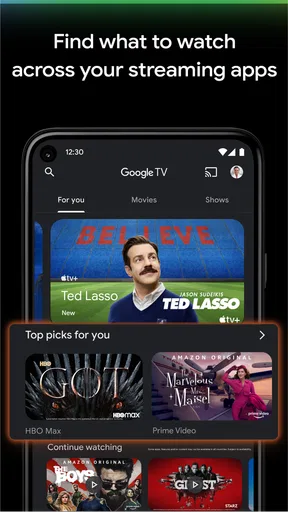
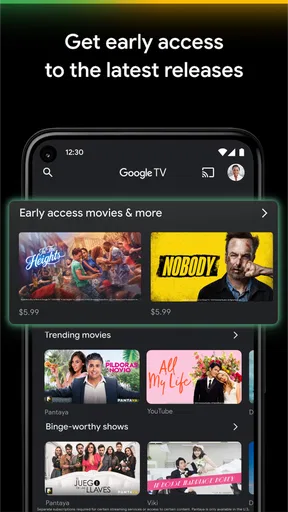
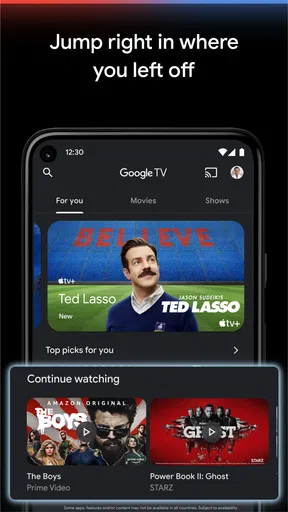
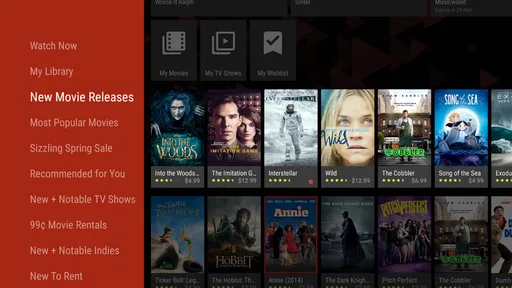
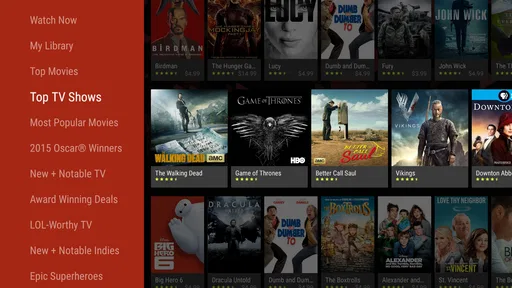
The home screen is where the magic begins. It greets you with a curated selection of content based on your viewing history. The layout is sleek, with a focus on what matters most—the shows and movies. You’ll find sections like "For You," "Top Picks," and "New Releases," making it super easy to dive into something great without getting lost in the abyss of endless options.
Content Curation
One of the standout features of Google TV is its ability to recommend content with uncanny accuracy. How does it know I’ve been on a true crime binge lately? It’s almost eerie! The algorithm picks up on your preferences, suggesting titles that align with your tastes. It's like having a personal DJ for your TV, spinning tracks that hit all the right notes.
Voice Search: The Lazy Viewer’s Dream
If you’re like me and sometimes can’t be bothered to type out long movie titles, the voice search feature is a lifesaver. Press the mic button on your remote and just say what you’re in the mood for. Whether it’s "romantic comedies from the 90s" or "Oscar-winning dramas," Google TV finds it without a hitch. It’s like magic, but better.
Integration with Smart Home Devices
Another feather in its cap is how well Google TV integrates with your smart home ecosystem. Have a Google Nest or Chromecast? You're in for a treat. You can control your TV with just your voice, dim the lights for movie night, or even set reminders for your favorite shows. It’s all about making your viewing experience as seamless and enjoyable as possible.
Parental Controls and Profiles
For families, the ability to create separate profiles is a game-changer. Each family member can have their own set of recommendations, and parental controls ensure that the kids only see what they're supposed to. It's peace of mind with a side of convenience.
Compatibility and Device Support
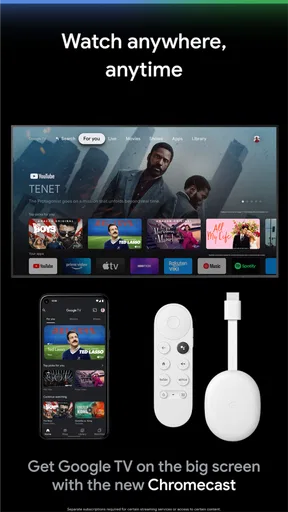
Google TV isn’t just limited to the latest gadgets. It’s compatible with a wide range of devices, from smart TVs and streaming dongles to gaming consoles. This flexibility means you can enjoy the Google TV experience without having to overhaul your entire setup.
Room for Improvement
Of course, no app is perfect. While Google TV is mostly smooth sailing, there are occasional hiccups with connectivity and syncing across devices. Sometimes, the recommendations can feel a tad repetitive if you’re not exploring new genres. But hey, nothing a quick feedback update can’t fix!
Wrapping up, Google TV feels like a breath of fresh air in the streaming world. It’s smart, intuitive, and just plain fun to use. If you’re tired of juggling between apps, give Google TV a spin. I promise, it might just become your new go-to for all things entertainment.
So, there you have it! Give it a whirl and see if it doesn’t change how you watch TV forever. Happy streaming!
Making the guide work for your household
In a shared home, separate profiles can make the starting screen feel less like a compromise: one person’s crime documentaries need not define everyone else’s suggestions. I’d make a point of choosing the right profile before browsing, especially when several people use the same television. That simple step can help keep recommendations relevant, though it does not guarantee that every household member will find every title suitable.
For parents, controls are worth checking before handing over the remote, rather than assuming a profile alone sets the right boundaries. I would review the available settings together with the child’s viewing habits and the services connected to the setup. The guide can help organize access, but families should still pay attention to the rules and controls of the services where playback actually happens.
Voice search is best for a clear starting point
Voice search can be especially convenient when a title has a long name or when I’m holding the remote from across the room. I get the most value from saying a specific title or a reasonably clear genre and mood, then checking the results rather than expecting a perfectly tailored answer every time. It reduces typing, but it does not remove the need to choose among results or confirm where a selection will play.
I would not rely on voice input in every situation. If the room is noisy, the wording is ambiguous, or I want to compare several options carefully, typing or browsing may be easier. Voice is a shortcut, not a replacement for the rest of the decision-making process, and it works best when I know what kind of answer I’m looking for.
Smart-home convenience has limits
For someone already using compatible Google smart-home equipment, voice control can make the whole evening feel more connected. I can see the appeal of lowering the lights and getting a show started without moving between several controls. But this is a bonus for an existing setup, not a reason by itself to choose the app. If you do not use compatible devices, the central viewing guide remains the more relevant part of the experience.
I would also separate convenience from reliability: a connected setup involves more than one device and service, so a snag may come from the television, the network, or the service being opened. When something fails, I’d check the simple handoff first—whether the device is connected and whether the destination app is available—before blaming the recommendation screen.
How it compares with opening each service
Compared with launching Netflix, Disney+, Hulu, or another service directly, Google TV’s advantage is having a broader starting point for discovery. It can be useful when I’m unsure which service to browse; the service’s own app is often preferable when I already know what I want to watch or want to manage that service’s account and playback in one place. These approaches complement each other more than one fully replaces the other.
That trade-off is important for anyone deciding whether to keep it in their routine. The guide earns its place when it reduces the mental work of remembering where to look. If it adds an extra screen without shortening the route to a show, I would simply go straight to the relevant service. The best workflow is the one that gets the household watching with the fewest unnecessary decisions.
My recommendation after following the full route
From the first vague “what should we watch?” to the moment a service begins playback, Google TV can make discovery feel more organized. Its strongest use is helping me start in one place, compare possibilities, and then hand off to the service that can play the choice. Its weaker moments come from that same handoff: the guide does not make separate subscriptions, accounts, and service interfaces disappear.
I’d recommend giving it a try if your watch nights often begin with indecision and you use more than one supported service. I would not make it the center of my setup if I only watch through one platform or want a single app that contains every title outright. Used for what it does well—a convenient route from browsing to a viewing choice—it can save a little time and make the first step of a movie night easier.
Pros
- User-friendly interface enhances navigation.
- Seamless integration with Google services.
- Extensive library of movies and shows.
- Personalized recommendations improve over time.
- Cross-device synchronization for convenience.
Cons
- Limited offline viewing options available.
- Some content requires additional subscriptions.
- Occasional app crashes disrupt viewing.
- Ad-supported content can be distracting.
- Search functionality can be inconsistent.
FAQs for Google TV
What is Google TV and how does it differ from Android TV?
Google TV is an interface built on top of Android TV, designed to enhance content discovery by organizing streaming services, live TV, and apps in one place. Unlike Android TV, which primarily focuses on the app experience, Google TV emphasizes personalized content recommendations, making it easier to find what you want to watch.
Can I use Google TV on any smart TV?
Google TV is available on select devices and smart TVs, primarily those released by brands like Sony and TCL. However, you can also access Google TV through the Chromecast with Google TV device, which can be connected to any TV with an HDMI port. Ensure your device is compatible before downloading.
Does Google TV support all streaming services?
Google TV supports a wide range of streaming services, including popular ones like Netflix, Disney+, Amazon Prime Video, and Hulu. However, availability may vary by region, and some services might not be integrated into the search and recommendation features. It's advisable to check compatibility with your favorite services.
Is a Google account necessary to use Google TV?
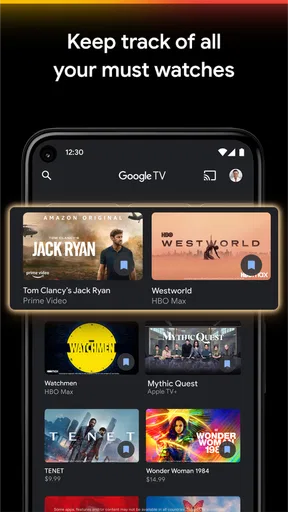
Yes, a Google account is required to use Google TV. This account allows you to access personalized content, sync your watchlist across devices, and use Google Assistant for voice commands. Having a Google account also enhances the overall experience by providing tailored recommendations based on your viewing habits.
How does Google Assistant integrate with Google TV?
Google Assistant is seamlessly integrated into Google TV, allowing users to control their viewing experience with voice commands. You can ask Google Assistant to play specific shows, control playback, and even manage smart home devices. This hands-free control enhances convenience, especially when navigating through multiple apps and services.


